Nevada: Vehicle controls and equipment — Warning Systems, Cameras and Detection Practice Test
Questions in this part include: “According to the handbook, what do Advanced Driver Assistance Systems (ADAS) do?” · “What do surround-view or around-view monitor systems show drivers to help them park more easily?”
Independent educational site · not affiliated with any government agency or DMV
Ready? Test yourself
- Instant feedback with an explanation
- Every answer cites its source in the manual
- Your best score is saved on this device
- Keyboard: press 1 to 4 to answer and Enter for the next question
Questions are original and based on the official manual "Nevada Driver's Handbook" (March 2024 (DMV 700)), Nevada Department of Motor Vehicles.
All 24 questions in this practice test
Take the test above first, then use this list to study. Tap “Show answer” to see the correct answer and explanation.
Show the questions and answersHide the questions
-
According to the handbook, what do Advanced Driver Assistance Systems (ADAS) do?
- Assist the driver but do not drive the vehicle by themselves
- Drive the vehicle so the driver does not need to pay attention
- Replace the need for mirrors and head checks
- Take over driving whenever the vehicle is moving slowly
Show answer
Correct answer: Assist the driver but do not drive the vehicle by themselves
ADAS technologies assist the driver but do not drive the vehicle by themselves.
Source: Nevada Driver's Handbook (March 2024 (DMV 700)), page 51 · Open this page in the manual (Manual page 51)
-
What is the primary purpose of vehicle warning systems technologies?
- To perform part of the driving function for the driver
- To brake automatically in every situation
- To provide warnings to the driver in specific circumstances
- To park the vehicle without driver input
Show answer
Correct answer: To provide warnings to the driver in specific circumstances
The primary purpose of vehicle warning systems technologies is to provide warnings to the driver in specific circumstances.
Source: Nevada Driver's Handbook (March 2024 (DMV 700)), page 51 · Open this page in the manual (Manual page 51)
-
How do vehicle warning systems technologies notify the driver that a crash is about to occur?
- By turning off the engine
- By sound, light, or vibration
- By shifting the vehicle into park
- By tightening the seat belts
Show answer
Correct answer: By sound, light, or vibration
Vehicle warning systems technologies notify the driver with a warning, by sound, light, or vibration, that a crash is about to occur.
Source: Nevada Driver's Handbook (March 2024 (DMV 700)), page 51 · Open this page in the manual (Manual page 51)
-
What does it mean that most vehicle warning technologies are passive?
- They automatically steer the vehicle away from a crash
- They only work when the driver turns them on manually
- They work only when the vehicle is parked or stopped
- They warn the driver but do not automatically prevent a crash
Show answer
Correct answer: They warn the driver but do not automatically prevent a crash
Passive means they warn the driver of a potential issue but do not automatically prevent a problem or crash.
Source: Nevada Driver's Handbook (March 2024 (DMV 700)), page 51 · Open this page in the manual (Manual page 51)
-
When does a back-up warning start scanning the area behind the vehicle?
- When the vehicle exceeds 25 mph
- When the driver turns on the headlights
- When the vehicle is parked
- When the driver shifts into reverse
Show answer
Correct answer: When the driver shifts into reverse
When the driver shifts into reverse, sensors scan the area behind the vehicle for the back-up warning.
Source: Nevada Driver's Handbook (March 2024 (DMV 700)), page 51 · Open this page in the manual (Manual page 51)
-
The driver should not become complacent and dependent on the back-up warning. What should the driver do while backing?
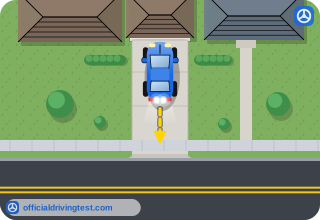
- Watch only the warning sounds and keep the wheel straight
- Check mirrors, look over the shoulder and use cameras if equipped
- Back up quickly so the sensors have less time to miss anything
- Rely on the sensors and look straight ahead through the windshield
Show answer
Correct answer: Check mirrors, look over the shoulder and use cameras if equipped
The driver should safely monitor and maneuver while backing, including checking side mirrors, rear-view mirror, over the shoulder (head checks), and camera(s), if equipped.
Source: Nevada Driver's Handbook (March 2024 (DMV 700)), page 51 · Open this page in the manual (Manual page 51)
-
How do blind spot monitors and warnings warn the driver of other vehicles in their blind spots?

- Through display of a symbol, sound, or vibration
- Through the horn of the other vehicle
- By steering the vehicle back into its lane
- By flashing the brake lights
Show answer
Correct answer: Through display of a symbol, sound, or vibration
Blind spot monitors warn the driver of other vehicles in their blind spots through display of a symbol, sound, or vibration.
Source: Nevada Driver's Handbook (March 2024 (DMV 700)), page 51 · Open this page in the manual (Manual page 51)
-
With a blind spot monitor, what should the driver always do before changing lanes?

- Wait for the monitor to display a warning symbol first
- Rely on the monitor's warning alone and skip head checks
- Check their mirrors and look over their shoulders
- Turn off the monitor and use only the turn signal
Show answer
Correct answer: Check their mirrors and look over their shoulders
The driver should always check their mirrors and look over their shoulders before changing lanes.
Source: Nevada Driver's Handbook (March 2024 (DMV 700)), page 51 · Open this page in the manual (Manual page 51)
-
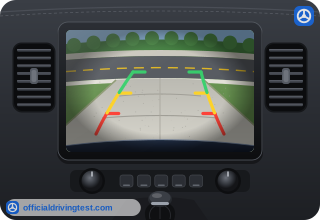
When does the rear camera activate to show the area behind the vehicle?
- When the vehicle slows below 25 mph
- When the driver shifts into reverse
- When the driver turns on the turn signal
- When the driver opens the door
Show answer
Correct answer: When the driver shifts into reverse
The rear camera engages when the driver shifts into reverse and shows the area behind the vehicle.
Source: Nevada Driver's Handbook (March 2024 (DMV 700)), page 52 · Open this page in the manual (Manual page 52)
-
When do sideview cameras show the driver an expanded view of a lane beside the vehicle?
- Only when the vehicle is traveling faster than 25 miles per hour
- Whenever the vehicle is shifted into reverse gear
- Only when the driver applies the brakes firmly
- When the turn signal is used or the feature is turned on
Show answer
Correct answer: When the turn signal is used or the feature is turned on
Sideview cameras show an expanded view of a lane beside the vehicle when the driver uses their turn signal or activates the feature manually.
Source: Nevada Driver's Handbook (March 2024 (DMV 700)), page 52 · Open this page in the manual (Manual page 52)
-
How should sideview cameras be used?
- Only when the vehicle is stopped at a traffic light
- Only when the vehicle is parked in a parking lot
- In conjunction with traditional mirrors and head checks
- Only on freeways, when changing lanes at high speed
Show answer
Correct answer: In conjunction with traditional mirrors and head checks
Sideview cameras should be used in conjunction with traditional mirrors and head checks (checking over the shoulders).
Source: Nevada Driver's Handbook (March 2024 (DMV 700)), page 52 · Open this page in the manual (Manual page 52)
-
What do surround-view or around-view monitor systems show drivers to help them park more easily?
- A virtual bird's-eye view of the vehicle's surroundings
- A close-up view of the engine compartment and tires
- A map showing the nearest available parking spaces
- A reading of the tire pressure and fuel level on screen
Show answer
Correct answer: A virtual bird's-eye view of the vehicle's surroundings
These systems help drivers park more easily by showing the vehicle’s surroundings through a virtual bird’s-eye view above the vehicle.
Source: Nevada Driver's Handbook (March 2024 (DMV 700)), page 52 · Open this page in the manual (Manual page 52)
-
In most vehicles with a surround-view monitor system, where is one camera placed?
- Inside the glove compartment
- On the roof above the windshield
- In the middle of the front bumper
- Inside each wheel well
Show answer
Correct answer: In the middle of the front bumper
In most vehicles, one camera is in the middle of the front bumper, with two more cameras looking down from the side view mirrors.
Source: Nevada Driver's Handbook (March 2024 (DMV 700)), page 52 · Open this page in the manual (Manual page 52)
-
Surround-view or around-view monitoring should be used in conjunction with what?
- Traditional mirrors and head checks
- Only the vehicle's display monitor
- Audio warnings alone
- Parking sensors instead of mirrors
Show answer
Correct answer: Traditional mirrors and head checks
Surround-View or Around-View Monitoring should be used in conjunction with traditional mirrors and head checks (checking over the shoulders).
Source: Nevada Driver's Handbook (March 2024 (DMV 700)), page 52 · Open this page in the manual (Manual page 52)
-
What does a curve speed warning alert the driver to?
- That the curve ahead has been closed to all traffic
- That the vehicle is drifting out of its lane too far
- That another vehicle is in the blind spot of the car
- That they are approaching a curve or exit at an unsafe speed
Show answer
Correct answer: That they are approaching a curve or exit at an unsafe speed
The vehicle alerts the driver through sound, vibration, or both that they are approaching a curve or exit at an unsafe speed.
Source: Nevada Driver's Handbook (March 2024 (DMV 700)), page 52 · Open this page in the manual (Manual page 52)
-
Even with a curve speed warning, what should the driver do when approaching curves or exits?
- Rely on the warning to set the speed
- Maintain a safe speed
- Slow down only after the alert sounds
- Keep a constant speed until alerted
Show answer
Correct answer: Maintain a safe speed
The driver should not become dependent on curve speed warnings and should maintain a safe speed while driving and approaching curves or exits.
Source: Nevada Driver's Handbook (March 2024 (DMV 700)), page 52 · Open this page in the manual (Manual page 52)
-
At about what speed do detection technologies generally alert the driver to a bicycle, pedestrian, or obstacle at low speeds?
- Around 25 mph
- Around 10 mph
- Around 45 mph
- Around 55 mph
Show answer
Correct answer: Around 25 mph
Detection technologies alert the driver while driving at low speeds, generally around 25 mph.
Source: Nevada Driver's Handbook (March 2024 (DMV 700)), page 52 · Open this page in the manual (Manual page 52)
-
Some detection systems can detect bicyclists, pedestrians, or obstacles only when they are:
- Behind the vehicle and moving in the opposite direction
- On either side of the vehicle and standing still
- Directly in front of the vehicle and moving in the same direction
- Anywhere within 25 feet of the vehicle
Show answer
Correct answer: Directly in front of the vehicle and moving in the same direction
Some systems can only detect bicyclists, pedestrians, or obstacles directly in front of the vehicle and moving in the same direction.
Source: Nevada Driver's Handbook (March 2024 (DMV 700)), page 52 · Open this page in the manual (Manual page 52)
-
What do some versions of obstacle detection do?
- Steer the vehicle around the obstacle
- Apply the vehicle's brakes automatically
- Turn the headlights toward the obstacle
- Sound the horn to warn the obstacle
Show answer
Correct answer: Apply the vehicle's brakes automatically
Some versions of obstacle detection will apply the vehicle’s brakes automatically.
Source: Nevada Driver's Handbook (March 2024 (DMV 700)), page 52 · Open this page in the manual (Manual page 52)
-
What should drivers do so they understand how they will be warned if a system detects a bicyclist, pedestrian, or obstacle?
- Ask a driving examiner
- Test it in a parking lot with a passenger
- Watch for the dashboard to turn red
- Read the owner's manual
Show answer
Correct answer: Read the owner's manual
Drivers should read the owner’s manual so they understand how they will be warned if the system detects a bicyclist, pedestrian, or obstacle.
Source: Nevada Driver's Handbook (March 2024 (DMV 700)), page 52 · Open this page in the manual (Manual page 52)
-
What may happen to the beeps from an obstacle detection system as the vehicle moves closer to the obstacle?
- They may become slower
- They may become quieter
- They stop completely
- They may become faster
Show answer
Correct answer: They may become faster
The beeps may become faster as the vehicle moves closer to the obstacle.
Source: Nevada Driver's Handbook (March 2024 (DMV 700)), page 52 · Open this page in the manual (Manual page 52)
-
What may it mean when the beeps from an obstacle detection system become continuous?
- The system has turned itself off
- A collision may be imminent
- The obstacle has moved away
- The system is ready to brake for the driver
Show answer
Correct answer: A collision may be imminent
A collision may be imminent when the beeps become continuous.
Source: Nevada Driver's Handbook (March 2024 (DMV 700)), page 52 · Open this page in the manual (Manual page 52)
-
Where does the handbook say drivers should be especially careful to check regularly for bicyclists, pedestrians, and obstacles, and not depend on detection systems?
- In urban areas
- On rural highways at night
- On freeway on-ramps
- In school zones only
Show answer
Correct answer: In urban areas
The driver should not depend on detection and should check regularly for bicyclists, pedestrians, and obstacles, especially in urban areas.
Source: Nevada Driver's Handbook (March 2024 (DMV 700)), page 53 · Open this page in the manual (Manual page 53)
-
What does a constant tone from parking sensors mean?

- The vehicle is too close to an object
- The parking space is large enough
- The sensors have stopped working
- The vehicle is parked correctly
Show answer
Correct answer: The vehicle is too close to an object
With parking sensors, a constant tone means the vehicle is too close to an object.
Source: Nevada Driver's Handbook (March 2024 (DMV 700)), page 53 · Open this page in the manual (Manual page 53)